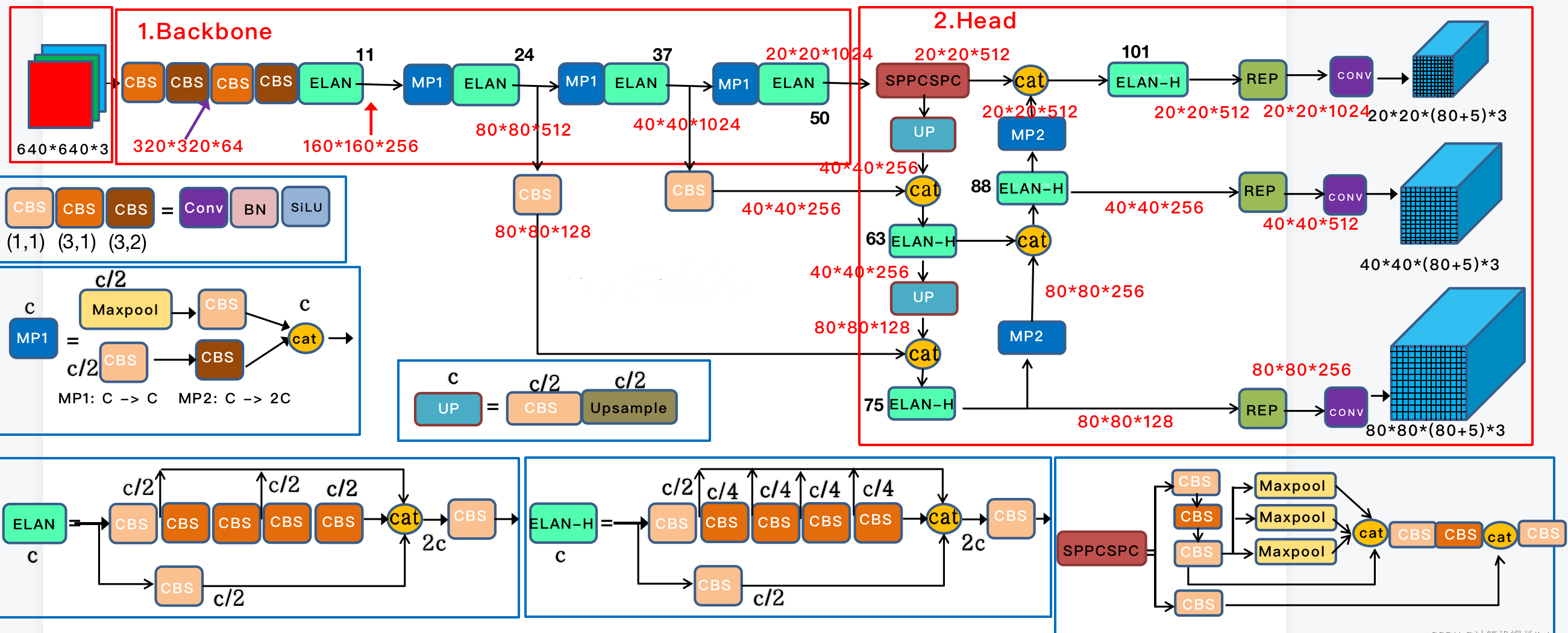
1
2
3
4
5
6
7
8
9
10
11
12
13
14
15
16
17
18
19
20
21
22
23
24
25
26
27
28
29
30
31
32
33
34
35
36
37
38
39
40
41
42
43
44
45
46
47
48
49
50
51
52
53
54
55
56
57
58
59
60
61
62
63
64
65
66
67
68
69
70
71
72
73
74
75
76
77
78
79
80
81
82
83
84
85
86
87
88
89
90
91
92
93
94
95
96
97
98
99
100
101
102
103
104
105
106
107
108
109
110
111
112
113
114
115
116
117
118
119
120
121
122
123
124
125
126
127
128
129
130
131
132
133
134
135
136
137
138
139
140
141
142
143
144
145
146
147
148
149
150
151
152
153
154
155
156
157
158
159
160
161
162
163
164
165
166
167
168
169
170
171
172
173
174
175
176
177
178
179
180
181
182
183
184
185
186
187
188
189
190
191
192
193
194
195
196
197
198
199
200
201
202
203
204
205
206
207
208
209
210
211
212
213
214
215
216
217
218
219
| import argparse
import time
from pathlib import Path
import cv2
import torch
import torch.backends.cudnn as cudnn
from numpy import random
from models.experimental import attempt_load
from utils.datasets import LoadStreams, LoadImages
from utils.general import check_img_size, check_requirements, check_imshow, non_max_suppression, apply_classifier, \
scale_coords, xyxy2xywh, strip_optimizer, set_logging, increment_path
from utils.plots import plot_one_box
from utils.torch_utils import select_device, load_classifier, time_synchronized, TracedModel
def detect(save_img=False):
#获取相应的参数和测试流(判断测试是本地图片还是网络图片流)
source, weights, view_img, save_txt, imgsz, trace = opt.source, opt.weights, opt.view_img, opt.save_txt, opt.img_size, not opt.no_trace
save_img = not opt.nosave and not source.endswith('.txt') # save inference images
webcam = source.isnumeric() or source.endswith('.txt') or source.lower().startswith(
('rtsp://', 'rtmp://', 'http://', 'https://'))
# Directories
#创建保存训练结果的文件夹
save_dir = Path(increment_path(Path(opt.project) / opt.name, exist_ok=opt.exist_ok)) # increment run
(save_dir / 'labels' if save_txt else save_dir).mkdir(parents=True, exist_ok=True) # make dir
# Initialize
#选择使用cpu还是cuda进行测试
set_logging()
device = select_device(opt.device)
half = device.type != 'cpu' # half precision only supported on CUDA
# Load model
'''加载权重文件(如果没有上传自己的权重文件,会自动下载预训练好的模型权重文件),同时检测图片大小,如果测试图片大小不是32的倍数,那么就自动调整为32的倍数(是调用make_divisible函数)。同时判断是否进行libtorch转换和参数half操作。'''
model = attempt_load(weights, map_location=device) # load FP32 model
stride = int(model.stride.max()) # model stride
imgsz = check_img_size(imgsz, s=stride) # check img_size
if trace:
model = TracedModel(model, device, opt.img_size)
if half:
model.half() # to FP16
# Second-stage classifier
'''用户是否选择用一个分类网络来对定位框里面的内容进行分类。一些用户喜欢使用第二阶段过滤第一阶段检测以减少 FP 的选项。如果你有一个在相同类上训练的分类器,你可以在那里指定它。这里可以使用任何分类器(EfficientNet、Resnet 等),唯一的要求是分类和检测模型在相同的类上训练。其实,一般都不会进这个分支的~'''
classify = False
if classify:
modelc = load_classifier(name='resnet101', n=2) # initialize
modelc.load_state_dict(torch.load('weights/resnet101.pt', map_location=device)['model']).to(device).eval()
# Set Dataloader
'''这里是判断测试流输入是什么格式文件,然后返回一个可迭代对象,便于后面对其进行遍历预测。我们进LoadImages函数里面看看如何进行数据加载的(这里传入三个参数,分别是待预测图片路径,网络支持的预测图片大小,网络的最大步长)。进入函数之后,会发现函数定义了两个内置函数__iter__和__next__,一般来说,只要在类中定义了这两个函数就表示该类返回的是可迭代对象,其中__iter__的作用是用来计数用的,而__next__是用于后续循环获取数据的。'''
vid_path, vid_writer = None, None
if webcam:
view_img = check_imshow()
cudnn.benchmark = True # set True to speed up constant image size inference
dataset = LoadStreams(source, img_size=imgsz, stride=stride)
else:
dataset = LoadImages(source, img_size=imgsz, stride=stride)
# Get names and colors
#对待预测所有类别进行颜色分配
names = model.module.names if hasattr(model, 'module') else model.names
colors = [[random.randint(0, 255) for _ in range(3)] for _ in names]
# Run inference
'''对上述生成的数据迭代对象进行遍历,对图片进行归一化操作。同时判断一下如果图片的channels维度是等于3,那么就在图片的第一维度添加一个batch_size的维度,变成四维。这里,img.ndimension()的作用是返回tensor对象的维度,img.unsqueeze()函数是在指定维度上添加一个维度。'''
if device.type != 'cpu':
model(torch.zeros(1, 3, imgsz, imgsz).to(device).type_as(next(model.parameters()))) # run once
old_img_w = old_img_h = imgsz
old_img_b = 1
t0 = time.time()
for path, img, im0s, vid_cap in dataset:
img = torch.from_numpy(img).to(device)
img = img.half() if half else img.float() # uint8 to fp16/32
img /= 255.0 # 0 - 255 to 0.0 - 1.0
if img.ndimension() == 3:
img = img.unsqueeze(0)
# Warmup
if device.type != 'cpu' and (old_img_b != img.shape[0] or old_img_h != img.shape[2] or old_img_w != img.shape[3]):
old_img_b = img.shape[0]
old_img_h = img.shape[2]
old_img_w = img.shape[3]
for i in range(3):
model(img, augment=opt.augment)[0]
# Inference
'''将测试图片喂入网络中,得到预测结果。这里,由模型推理所得到的预测结果的shape是(1,16380,6),可见预测出来了很多候选框,需要后续通过nms进行筛选。当然了!这里16380是基于该图出的预测框,每张图出的结果都不一样。'''
t1 = time_synchronized()
with torch.no_grad(): # Calculating gradients would cause a GPU memory leak
pred = model(img, augment=opt.augment)[0]
t2 = time_synchronized()
# Apply NMS
'''对预测结果进行nms操作,去除多余的框。通过nms操作,最终pred变成了(25,6),即最后只剩下25个预选框。同时,输出每个预选框的x1y1x2y2,置信度,类别数共六个值。'''
pred = non_max_suppression(pred, opt.conf_thres, opt.iou_thres, classes=opt.classes, agnostic=opt.agnostic_nms)
t3 = time_synchronized()
# Apply Classifier
if classify:
pred = apply_classifier(pred, modelc, img, im0s)
# Process detections
'''针对每一张待预测图片,遍历输出结果,创建相对于的保存路径,gn表示的是经过resize之后的长宽,这里为(416,640,416,640),是为了后面xyxy2xywh操作用的。'''
for i, det in enumerate(pred): # detections per image
if webcam: # batch_size >= 1
p, s, im0, frame = path[i], '%g: ' % i, im0s[i].copy(), dataset.count
else:
p, s, im0, frame = path, '', im0s, getattr(dataset, 'frame', 0)
p = Path(p) # to Path
save_path = str(save_dir / p.name) # img.jpg
txt_path = str(save_dir / 'labels' / p.stem) + ('' if dataset.mode == 'image' else f'_{frame}') # img.txt
gn = torch.tensor(im0.shape)[[1, 0, 1, 0]] # normalization gain whwh
if len(det):
# Rescale boxes from img_size to im0 size
det[:, :4] = scale_coords(img.shape[2:], det[:, :4], im0.shape).round()
# Print results
'''这里,det[:, -1]表示的是该待预测图片所得到的300个预测框的类别,unique()的作用是查看这300个框一共会有哪些类别,然后统计属于每个类别的预测框数量。'''
for c in det[:, -1].unique():
n = (det[:, -1] == c).sum() # detections per class
s += f"{n} {names[int(c)]}{'s' * (n > 1)}, " # add to string
# Write results
'''reversed函数是python内置的一个函数,作用是将一个可迭代的对象进行数据反转。这里其实就是将300个预测框的反向遍历,即最先遍历300个预测框最后一个。然后判断是否进行txt保存操作和保存图片或者可视化预测结果图片操作。在保存txt模块里面,首先用view(1, 4)函数将tensor的shape调整为(1,4),该函数的作用其实跟resize一样的,然后直接除以gn,上述gn的形式是(长,宽,长,宽),这里就起到作用了。然后喂入xyxy2xywh函数转换为xywh格式。'''
for *xyxy, conf, cls in reversed(det):
if save_txt: # Write to file
xywh = (xyxy2xywh(torch.tensor(xyxy).view(1, 4)) / gn).view(-1).tolist() # normalized xywh
line = (cls, *xywh, conf) if opt.save_conf else (cls, *xywh) # label format
with open(txt_path + '.txt', 'a') as f:
f.write(('%g ' * len(line)).rstrip() % line + '\n')
if save_img or view_img: # Add bbox to image
label = f'{names[int(cls)]} {conf:.2f}'
plot_one_box(xyxy, im0, label=label, color=colors[int(cls)], line_thickness=1)
# Print time (inference + NMS)
print(f'{s}Done. ({(1E3 * (t2 - t1)):.1f}ms) Inference, ({(1E3 * (t3 - t2)):.1f}ms) NMS')
# Stream results
if view_img:
cv2.imshow(str(p), im0)
cv2.waitKey(1) # 1 millisecond
# Save results (image with detections)
if save_img:
if dataset.mode == 'image':
cv2.imwrite(save_path, im0)
print(f" The image with the result is saved in: {save_path}")
else: # 'video' or 'stream'
if vid_path != save_path: # new video
vid_path = save_path
if isinstance(vid_writer, cv2.VideoWriter):
vid_writer.release() # release previous video writer
if vid_cap: # video
fps = vid_cap.get(cv2.CAP_PROP_FPS)
w = int(vid_cap.get(cv2.CAP_PROP_FRAME_WIDTH))
h = int(vid_cap.get(cv2.CAP_PROP_FRAME_HEIGHT))
else: # stream
fps, w, h = 30, im0.shape[1], im0.shape[0]
save_path += '.mp4'
vid_writer = cv2.VideoWriter(save_path, cv2.VideoWriter_fourcc(*'mp4v'), fps, (w, h))
vid_writer.write(im0)
if save_txt or save_img:
s = f"\n{len(list(save_dir.glob('labels/*.txt')))} labels saved to {save_dir / 'labels'}" if save_txt else ''
#print(f"Results saved to {save_dir}{s}")
print(f'Done. ({time.time() - t0:.3f}s)')
if __name__ == '__main__':
parser = argparse.ArgumentParser()
#测试所使用的权重文件
parser.add_argument('--weights', nargs='+', type=str, default='yolov7.pt', help='model.pt path(s)')
#测试的图片/图片文件夹/摄像头接口
parser.add_argument('--source', type=str, default='inference/images', help='source')
#测试图片大小
parser.add_argument('--img-size', type=int, default=640, help='inference size (pixels)')
##测试过程中所需的阈值
parser.add_argument('--conf-thres', type=float, default=0.25, help='object confidence threshold')
#测试过程中nms所需的阈值
parser.add_argument('--iou-thres', type=float, default=0.45, help='IOU threshold for NMS')
#使用cpu还是gpu进行测试
parser.add_argument('--device', default='0', help='cuda device, i.e. 0 or 0,1,2,3 or cpu')
#是否将测试结果展示
parser.add_argument('--view-img', action='store_true', help='display results')
#是否保存测试之后的txt标签文件
parser.add_argument('--save-txt', action='store_true', help='save results to *.txt')
#在txt中是否保存测试置信度结果大小
parser.add_argument('--save-conf', action='store_true', help='save confidences in --save-txt labels')
#是否保存测试图片
parser.add_argument('--nosave', action='store_true', help='do not save images/videos')
parser.add_argument('--classes', nargs='+', type=int, help='filter by class: --class 0, or --class 0 2 3')
parser.add_argument('--agnostic-nms', action='store_true', help='class-agnostic NMS')
parser.add_argument('--augment', action='store_true', help='augmented inference')
parser.add_argument('--update', action='store_true', help='update all models')
#测试结果保存路径
parser.add_argument('--project', default='runs/detect', help='save results to project/name')
#测试结果保存路径文件夹名
parser.add_argument('--name', default='exp', help='save results to project/name')
parser.add_argument('--exist-ok', action='store_true', help='existing project/name ok, do not increment')
parser.add_argument('--no-trace', action='store_true', help='don`t trace model')
opt = parser.parse_args()
print(opt)
#check_requirements(exclude=('pycocotools', 'thop'))
with torch.no_grad():
if opt.update: # update all models (to fix SourceChangeWarning)
for opt.weights in ['yolov7.pt']:
detect()
strip_optimizer(opt.weights)
else:
detect()
|